The Gap
I use Claude daily. I also run 24 self-hosted services on my homelab. For months, these two worlds were completely separate. Claude couldn't see my documents. It couldn't check if my services were healthy. It couldn't trigger any of my 80+ n8n workflows.
Every time I wanted Claude's help with something that involved my infrastructure, I had to manually copy-paste information back and forth. "Here's the document text. Here's the workflow output. Here's what my system says." It was tedious and lossy.
MCP (Model Context Protocol) fixed that.
What MCP Actually Is
MCP is a standardized protocol that lets AI assistants use external tools. Instead of just processing text you paste in, an MCP-connected assistant can actively reach out to services, query APIs, and take actions on your behalf.
Think of it as giving Claude a set of specialized tools. A Paperless MCP server gives it the ability to search your documents. An n8n MCP server lets it trigger workflows. A Qdrant MCP server enables semantic search across your knowledge base.
The protocol is standardized. The same MCP server works with Claude Desktop, Cursor, Windsurf, Cline, and any other MCP-compatible client.
What I Built
Paperless-ngx MCP Server
This was the first one and the most impactful. Seven tools that let Claude interact with my entire document library:
Search documents: Full-text search across all OCR'd content
Get document details: Retrieve metadata, tags, content by ID
List recent documents: See what's been added lately
Browse tags and types: Understand the taxonomy
Update documents: Change metadata, add tags
Now instead of "let me go find that document and paste the relevant section," I just say "search my documents for the vendor agreement from last month." Claude finds it, reads it, and answers my question in context.
n8n Workflow MCP Server
Six tools for workflow management:
List all workflows and their status
Get detailed workflow configuration
Trigger a workflow execution
Enable or disable workflows
View execution history and results
The use case: I'm working on a project in Claude and need to run a data processing pipeline. Instead of switching to the n8n UI, I say "run the document ingestion workflow" and it fires. When it completes, I can ask for the execution results.
Qdrant Vector Search MCP Server
Seven tools for semantic knowledge retrieval:
Search by semantic similarity across collections
Upsert new vectors with metadata
List and inspect collections
Get and delete specific points
This turns Claude into a knowledge assistant that understands my entire personal knowledge base. "What do I know about Docker networking?" searches my notes, documents, and wiki by meaning, not just keywords.
The Technical Architecture
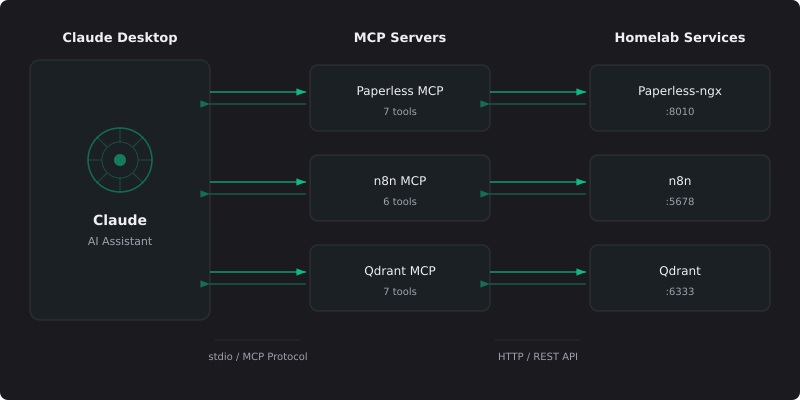
Each MCP server is a standalone Node.js process that communicates with Claude Desktop over stdio (standard input/output). The architecture is deliberately simple:
Claude Desktop connects via stdio to three MCP servers (Paperless, n8n, Qdrant), each of which makes HTTP requests to the corresponding homelab service API.
Key design decisions:
TypeScript with Zod validation: Every tool input is validated before it reaches the service API. No malformed requests, no cryptic errors.
Graceful error handling: If a service is down, the MCP server returns a descriptive error message instead of crashing.
Response truncation: Large API responses get truncated to 25,000 characters with a note that more data is available. This prevents context window overflow.
No cloud dependencies: Everything communicates over the local network. No external APIs, no telemetry, no phone-home.
Configuration
Adding an MCP server to Claude Desktop requires a JSON configuration entry. Point the server at your service URL, provide an API key, and restart Claude Desktop. The tools appear automatically through the MCP handshake, with no manual registration or configuration in the AI client.
What Changed
Before MCP, Claude was a general-purpose assistant that happened to be smart. After MCP, Claude is a smart assistant that knows my infrastructure.
Some real examples from the past week:
"Find all my tax documents from 2025": Claude searches Paperless, returns 14 documents with dates and tags
"What automation workflows are currently failing?": Claude checks n8n execution history, identifies 2 workflows with errors
"Search my notes for anything related to Docker volume management": Qdrant returns 6 semantically relevant results from across my notes and wiki
"Run the backup verification workflow and tell me if everything passed": Claude triggers the workflow, waits for completion, reports results
Each of these would have taken 2-5 minutes of manual tab-switching, API querying, and result interpretation. With MCP, they take 10 seconds.
Lessons for Building MCP Servers
Start with read-only tools
Your first MCP server should only read data, not modify it. Search, list, and get operations are safe. Add write operations (update, delete, execute) only after you trust the interaction patterns.
Validate everything
AI assistants will sometimes pass unexpected inputs. Zod schemas catch malformed requests before they hit your service APIs. Every tool should validate its inputs and return clear error messages.
Handle failures gracefully
Services go down. Network connections fail. Your MCP server should never crash the AI session. Catch errors, return descriptive messages, and let the AI assistant communicate the problem to the user.
Truncate large responses
AI context windows have limits. If a Paperless search returns 50 documents, truncate to the top 10 with a note that more exist. The AI can request more if needed.
One server per service
Keep MCP servers focused. One server for Paperless, one for n8n, one for Qdrant. This makes them independently deployable, testable, and configurable.
What's Next
The MCP ecosystem is growing fast. I'm building additional servers for BookStack (wiki search), Uptime Kuma (service monitoring), and a unified "Homelab Hub" that provides a single-tool overview of the entire infrastructure.
Where I’m heading: an AI assistant that understands my entire digital life (documents, notes, wiki, services, automations) and can both read and act on all of it, without any data leaving my network. And with MCP, most of that already works.